Create Professional Attendance Sheets in Seconds – Free Online Generator
Whether you're a school teacher, college lecturer, or university administrator, our free Attendance Sheet Generator creates a professional, print-ready sheet in under 60 seconds.

Every educator knows the frustration—a new term starts, and before the first session, a fresh attendance register needs to be ready. Building one from scratch can take 30 to 45 minutes. Unlike generic templates and manual methods, our free Attendance Sheet Generator streamlines the process by automatically formatting, calculating, and customizing your sheets. Enter your details, select your month and year, and download a professional, print-ready attendance sheet in under 60 seconds. No account required and completely free to use.
Table of Contents
- What Is the Attendance Sheet Generator?
- Who Is This Tool For?
- Why Attendance Tracking Matters
- Key Features
- How to Create Your Attendance Sheet
- Standard Attendance Marking Codes
- Best Practices for Attendance Records
- Attendance Sheet Generator vs Manual Methods
- Frequently Asked Questions
What Is the Attendance Sheet Generator?
An Attendance Sheet Generator is a free online tool that automatically creates professionally formatted attendance registers based on your requirements. Just enter your institution name, class or department details, student names, roll number (optional), and any custom columns you need. The tool handles all formatting and calculations for you.
Whether you need a school attendance register, a college lecture attendance sheet, a university department tracker, or a training institute register, the generator creates a professional document ready for printing or digital use.
The goal is simple: no Excel skills, no design work, and no complicated setup. Enter your information and receive a professional attendance register instantly.
Who Is This Tool For?
This tool is designed for educational institutions and training organizations of all sizes.
Schools
Teachers and school administrators can create daily, weekly, or monthly attendance registers for classes from kindergarten through secondary education. Features include roll number tracking, attendance percentages, and class-wise organization.
Colleges
College lecturers and administrators can generate subject-specific attendance sheets, monitor student attendance requirements, and maintain organized attendance records for multiple courses.
Universities
University departments can create attendance registers for lectures, seminars, laboratory sessions, and research programs while maintaining accurate records for compliance and reporting purposes.
Training Institutes and Coaching Centers
Training organizations can track batch attendance, course participation, and workshop attendance using customized attendance sheets designed for their specific needs.
Why Attendance Tracking Matters
Accurate attendance records play a vital role in educational success and institutional compliance.
Attendance records help educators identify students who may be struggling with participation and allow early intervention before attendance issues affect academic performance.
Many educational boards, colleges, and universities require students to maintain minimum attendance percentages to qualify for examinations and academic progression.
Attendance records are also important for accreditation reviews, inspections, audits, and institutional reporting. In many countries, educational institutions are required to retain attendance records for several years.
Maintaining organized attendance records helps institutions demonstrate accountability, compliance, and effective student management.
Key Features
This Attendance Sheet Generator includes the following features:
- Student's Name and Roll Number
- Select Month and Year
- Institution logo support
- Subject-wise and course-wise attendance sheets
- Print-ready PDF output
- Mobile-friendly access
- Secure and private data handling
- Unlimited attendance sheet generation
- Support for schools, colleges, universities, and training institutes
How to Create Your Attendance Sheet
Creating a professional attendance sheet takes only a few simple steps.
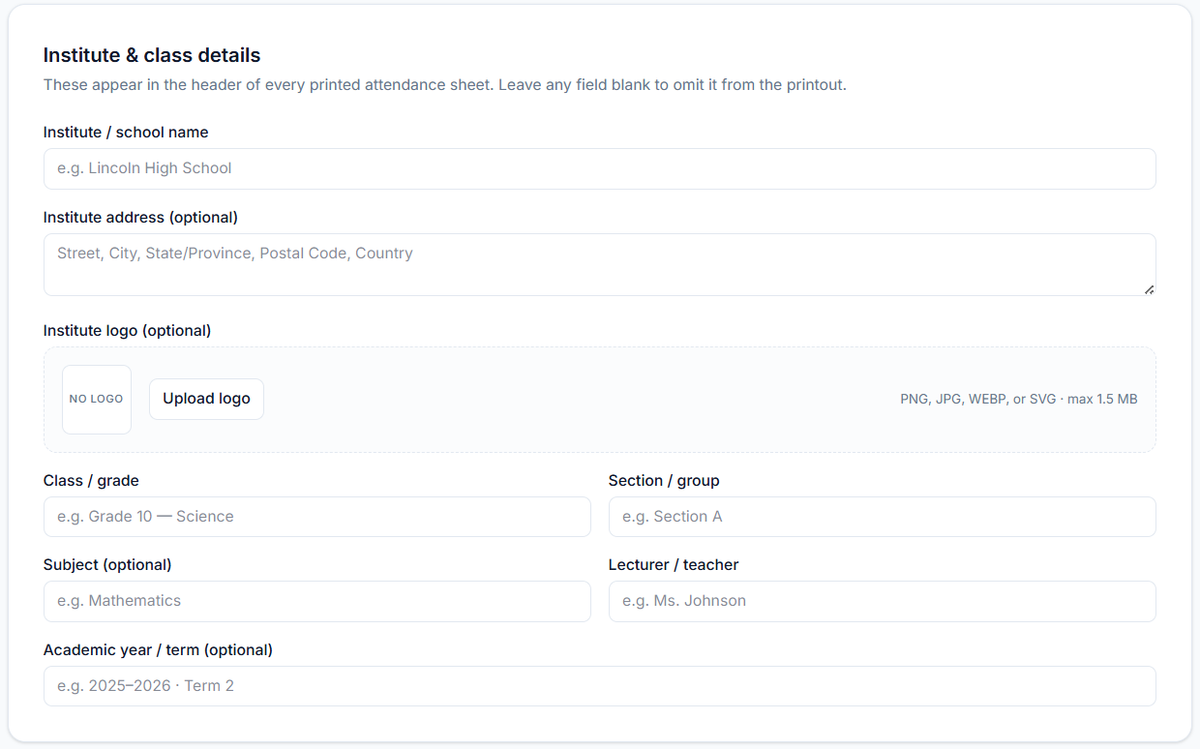
Step 1: Enter Institution Details
Add your institution name, class, department, subject, teacher, or coordinator information. This information will appear in the attendance sheet header.
Step 2: Select Required Month and Year
Choose the month and year for your attendance register. The tool automatically generates date columns for the selected period.

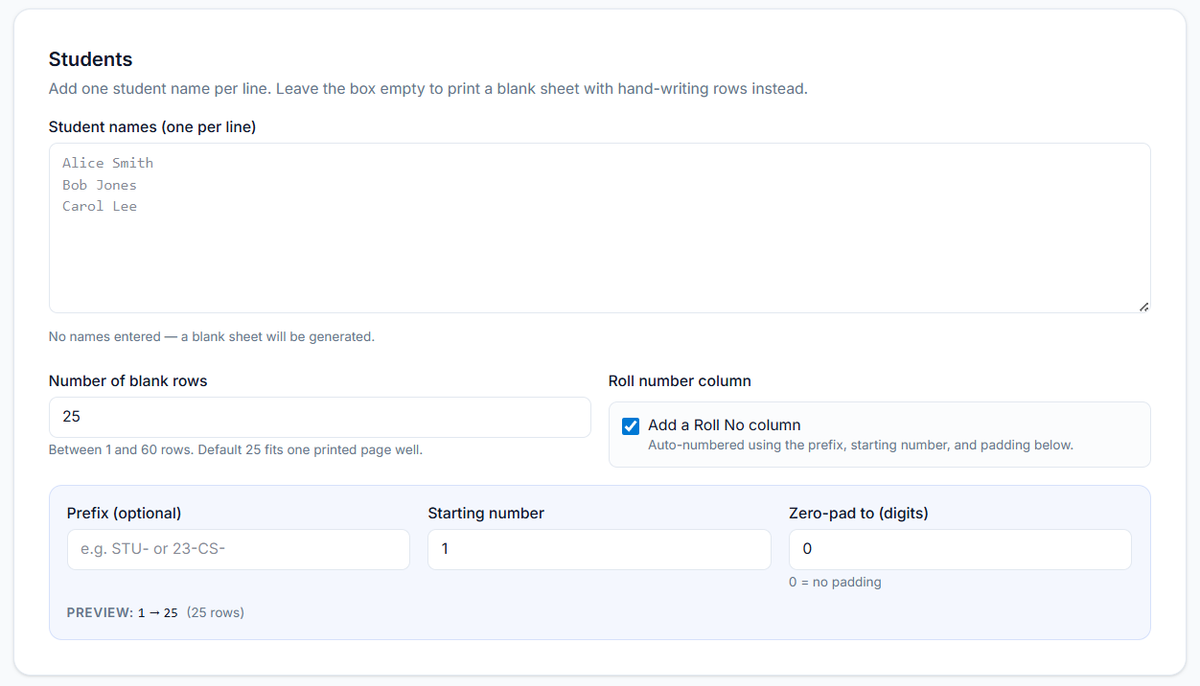
Step 3: Add Student Names and Roll Numbers
Enter student names, roll numbers, enrollment numbers, or other identification details. You can organize names alphabetically or by roll number.
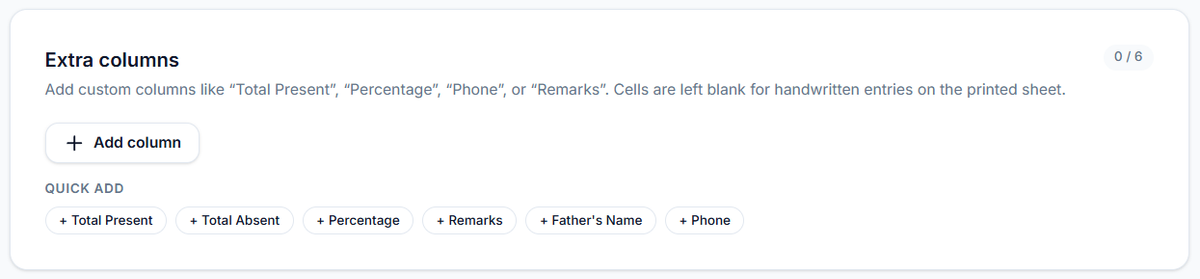
Step 4: Customize Columns
Add attendance status fields such as Present, Absent, Late, Half-Day, Leave, Remarks, or Signature columns according to your requirements.
Step 5: Generate and Download
Preview your attendance sheet and download it as a PDF for printing or digital record keeping.
Standard Attendance Marking Codes
Most educational institutions use standard attendance codes.
- P = Present
- A = Absent
- L = Leave
- H = Holiday
These codes can be customized according to institutional requirements.
Best Practices for Attendance Records
Mark Attendance Promptly
Attendance should be recorded at the beginning of each class, lecture, or session to ensure accuracy.
Use Consistent Formats
Maintain the same attendance format across all classes and departments for easier management and reporting.
Monitor Attendance Percentages
Regularly review attendance percentages to identify students who may be approaching attendance shortage thresholds.
Archive Records Properly
Store attendance records in organized folders based on academic year, class, department, subject, and month.
Attendance Sheet Generator vs Manual Methods
Traditional attendance management often requires creating spreadsheets manually, formatting columns, entering dates, and calculating attendance percentages by hand.
For schools, colleges, universities, and training institutes, using an attendance sheet generator can significantly improve efficiency while maintaining accurate and organized records.
Frequently Asked Questions
Is the Attendance Sheet Generator free?
Yes. The tool is completely free and does not require registration.
What file formats can I download?
You can download attendance sheets in a PDF File.
Can I create subject-wise attendance sheets?
Yes. Separate attendance sheets can be created for individual subjects and courses.
Can I add my institution's logo?
Yes. Schools, colleges, universities, and training institutes can add their logos to attendance sheets.
Is student data stored?
No. Your data remains private and is not permanently stored.
Does the tool work on mobile devices?
Yes. The Attendance Sheet Generator works on phones, tablets, laptops, and desktop computers.
Generate Your Professional
Attendance Sheet — Free
One tool. Every institution. Ready in 60 seconds.
100% Free Forever PDF & Excel Export No Account Needed
Found this useful?
Try our free tools — calculate your GPA, check college GPA requirements, or generate an attendance sheet in seconds.