Final Grade Calculator: Step-by-Step Guide & Free Tool
Use our free final grade calculator to instantly find the exact score you need on your final exam to pass or hit your target grade. No manual math required!
Final Grade Calculator: Step-by-Step Guide & Free Tool
Final exam season brings a common question.
How many marks do I need to pass this exam?
How many marks do I need to reach my target grade? Using a free online final grade calculator can quickly remove the guesswork from this stressful time.
It shows the exact score you need to meet your academic goals.
The needed exam score depends on your current coursework marks, maximum possible marks, exam weight, and target overall percentage.
This guide explains how the calculation works. You receive immediate results without doing any manual calculations.
Table of Contents
- How a Final Grade Calculator Helps You Plan Your Academic Success.
- Why You Need to Know Your Minimum Final Exam Score
- How the Final Grade Formula Works
- Step-by-Step: How to Calculate Your Final Grade
- Worked Example
- How to Use the EduToolsHub Final Grade Calculator
- What to Do Once You Know Your Target Score
- Frequently Asked Questions
How a Final Grade Calculator Helps You Plan Your Academic Success?
A final grade calculator is a digital tool. It tells you the minimum score you need on your final exam. This helps you reach a target overall course percentage.
It works backwards from your target goal. It calculates the exam score you need to achieve your desired overall grade percentage.
The EduToolsHub Final Grade Calculator does this in real time. You enter your marks so far, the total marks for that work, how much the final exam is worth, and your target percentage. The result updates instantly as you type — no button to press, no waiting.
Why You Need to Know Your Minimum Final Exam Score
Knowing exactly how many marks you need on your final exam gives you three practical advantages.
It Removes Uncertainty
Instead of guessing whether you can still pass, you know the exact number you are working toward. That is much less stressful than starting exam prep blind and wondering if your coursework marks are enough.
It Identifies Whether Your Goal Is Still Achievable
If you think you need more points than the exam allows, talk to your teacher soon. Try to do it before the grading period ends. Ask whether there are any extra-credit assignments, make-up opportunities, corrections, or other ways to demonstrate your understanding. Don’t hold off until grades have already been posted, because many teachers follow strict cutoffs and might not be able to revise grades after they’re officially finalized.
How the Final Grade Formula Works
Your overall course percentage is made up of two parts: what you have already scored on completed assessments, and what you will score on the final exam. Both are weighted against the total possible marks in the course.
The formula to find the minimum marks you need on the final exam is:
Required Final Marks = (Target Percentage x Total Course Marks) - Marks Obtained So Far
Where:
Total Course Marks = Total Marks of Completed Assessments + Final Exam Total Marks
In plain terms: multiply your target percentage by the total marks available in the entire course, then subtract the marks you have already earned. What remains is the minimum you need on the final exam.
Step-by-Step: How to Calculate Your Final Grade
Follow these steps to work out your minimum final exam score manually.
Step 1: Add Your Marks Obtained So Far
Gather all graded work you finished before the final exam. Include tests, assignments, midterms, quizzes, projects, and any other assessed work. Add the total marks you actually scored across all of them.
For example, if you scored 65 on a midterm, 28 on an assignment, and 85 on a quiz, your marks obtained so far are 178.
Step 2: Add the Total Marks of Completed Assessments
Now add the maximum possible marks for that same work — not what you scored, but what the maximum was for each piece. This is the total marks available across all assessed work completed before the final exam.
If the midterm was out of 100, the assignment out of 40, and the quiz out of 100, your total is 240.
Step 3: Note the Final Exam Total Marks
Determine how many marks the final exam is worth in your course grading scheme. This is the maximum score available on the final exam itself. Test your course syllabus or ask your lecturer if you are unsure.
If your final exam is out of 100, your final exam total marks are 100.
Step 4: Set Your Target Percentage
Decide what overall percentage you are aiming for. This is usually your passing mark, often 40% or 50%, depending on your institution. It may be higher if you’re aiming for a merit, distinction, or scholarship grade. Always check your syllabus for the exact requirement.
Step 5: Apply the Formula
Now put the numbers together:
Total Course Marks = 240 + 100 = 340
Required Final Marks = (0.50 x 340) - 178
Required Final Marks = 170 - 178
Required Final Marks = -8
A negative result means you have already passed. You do not need any marks on the final exam to reach 50% — your existing coursework has already secured it.
Worked Example
This example uses the same numbers as the EduToolsHub Final Grade Calculator demo. A student has scored 320 out of 400 in coursework. Final exam is worth 100 marks. The student needs at least 50% overall to pass the course.
Total Course Marks = 400 + 100 = 500
Required Final Marks = (0.50 x 500) - 320 = 250 - 320 = -70
Again, a negative result. Your coursework alone has already exceeded the 50% threshold.
Raising the Target to 70%
Now, suppose you want to aim higher — a 70% overall instead of just passing.
Required Final Marks = (0.70 x 500) - 320 = 350 - 320 = 30
You need exactly 30 marks out of 100 on the final exam to reach 70% overall, because (320 + 30) divided by 500 equals 0.70, or 70%.
This is exactly the logic the EduToolsHub calculator applies — instantly, as you type.
How to Use the EduToolsHub Final Grade Calculator
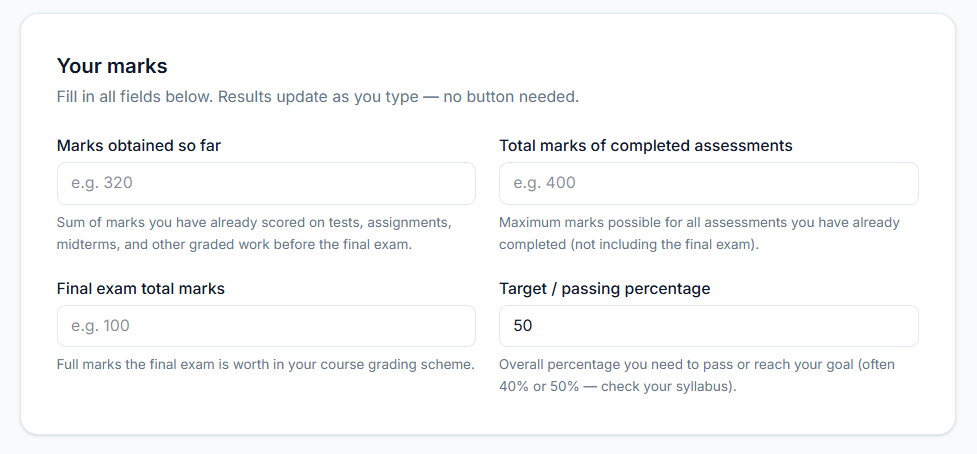
The EduToolsHub Final Grade Calculator has four input fields. Here is exactly what to enter each one.
Field 1: Marks Obtained So Far
Enter the total number of marks you have actually scored on all graded work completed before the final exam. Enter all marked assessment scores except the final exam, which you must enter separately.
Field 2: Total Marks of Completed Assessments
Enter the maximum marks possible for all the assessed work you have already completed. This is the denominator for your internal score. The total marks on all work graded before the final. It does not include the final exam.
Field 3: Final Exam Total Marks
Enter the maximum marks the final exam is worth in your course grading scheme. You can find this in your course syllabus, assessment guide, or by asking your lecturer or teacher directly.
Field 4: Target Percentage
Enter the overall percentage you are aiming to achieve in the course. The tool defaults to 50%, which is the standard passing mark in many institutions. Change this to whatever threshold applies to your course — 40%, 60%, 70%, or higher.
Reading Your Result
Once all four fields are filled in, the result updates instantly. The calculator tells you exactly how many marks you need on the final exam to hit your target percentage — no button to press, no page refresh.
If the result is zero or negative, your coursework has already secured your target grade. If the result is higher than the total marks available on the final exam, your target is no longer mathematically reachable and you should speak to your institution about your options as soon as possible.
What to Do Once You Know Your Target Score
Once you have your minimum required score, you can turn it into a practical study plan.
If Your Required Score Is Low
You have a comfortable margin. Use this information to study strategically rather than trying to cover everything. Focus on high-yield topics and the areas where you can pick up marks most efficiently. Avoid spending hours on content that will not move your score significantly.
If Your Required Score Is High
You need to maximise your exam performance. Research from the American Psychological Association suggests that active recall and spaced repetition are among the most effective study techniques. Prioritise past papers, review core concepts, and target your known weak areas. Speak to your teacher or lecturer about the exam structure and which topics carry the most weight, so you can concentrate your preparation where it counts.
If Your Required Score Exceeds the Final Exam Total
Your target is mathematically out of reach through the exam alone. Do not wait until after results are released to act. Speak to your institution now about grade recovery options, academic appeals, extra credit opportunities, or alternative assessments that may still be available to you.
In every case, knowing your number puts you in control. Uncertainty is the enemy of effective exam preparation — a clear target eliminates it.
Frequently Asked Questions
What is the passing percentage I should enter?
Use the passing mark specified in your course syllabus. Many universities set this at 40% or 50%, but it varies by institution and country. For example, institutions such as the University of Michigan and the University of California publish their own grading policies.
What counts as marks obtained so far?
The total of all marks you have actually scored on every piece of graded work completed before the final exam. Include tests, assignments, midterms, quizzes, projects, practicals, and any other assessments that have already been marked. Do not include the final exam, as that is entered separately in its own field.
What if I do not know the total marks of my completed assessments?
Add the maximum marks for each piece of graded work you have completed. If an assignment was out of 50 and a midterm was out of 100, your total marks of completed assessments is 150. Check your syllabus, marksheets, or student portal for the exact figures.
What does a negative result mean?
A negative grading scale means your target percentage is already secured by your coursework alone. Even if you scored zero on the final exam, you would still meet your target. You do not need any specific number of marks to reach your goal — though performing well on the final will only improve your overall result.
What does it mean if the required marks are higher than the final exam total?
It means your target percentage is no longer mathematically reachable through the final exam. No matter how well you perform on the exam, your overall course percentage cannot reach the target you entered. Speak to your institution as soon as possible about your available options.
Does the calculator work for all grading systems?
Yes. The calculator works with any marks-based grading system. It does not rely on letter grades or GPA scales — it works purely with numbers, making it applicable to any course, institution, or country that uses marks and percentages.
Is the EduToolsHub Final Grade Calculator free to use?
Yes, it’s entirely free to use. You don’t need to log in, create an account, sign up for a subscription, or pay any hidden fees. Open the tool and start entering your marks immediately.
Can I use the calculator on my phone?
Yes. The calculator is fully mobile-responsive and works on smartphones, tablets, and desktop computers. Results update in real time on all devices as you type.
You can also use our GPA Calculator to estimate semester performance.
Need to convert grades? Try our GPA to Percentage Calculator.
Final Thoughts
Knowing how many marks you need on your final exam turns vague academic anxiety into a concrete, actionable target. A well-defined goal is something you can genuinely plan around — and that planning is what separates success from just missing the mark.
The free EduToolsHub Final Grade Calculator gives you that number in seconds. Enter your marks obtained so far, the total marks of your completed work, the marks your final exam is worth, and your target percentage. Your required score appears instantly.
Use the free EduToolsHub Final Grade Calculator now and walk into your exam knowing exactly what you need.
Found this useful?
Try our free tools — calculate your GPA, check college GPA requirements, or generate an attendance sheet in seconds.